
Microsoft Copilot
Microsoft 365 Copilot, inside the security you already run.
Microsoft 365 Copilot works inside your Microsoft 365 tenant. It follows the permissions and labels already in place and sits under the same identity, compliance and threat protection as your email and files. We prepare your tenant, run a pilot to measure the value, then roll Copilot out to the roles where it helps.
- Readiness and governance
- Everyday productivity
- Connectors and agents
Why Copilot
A secure AI platform that uses the controls you already have.
Copilot runs inside Microsoft 365. It answers from your own mail, files, chats and meetings, and inherits the controls you already have: Entra ID for sign-in, Purview for labels and data loss prevention, Defender for threat protection, and your audit and retention settings.
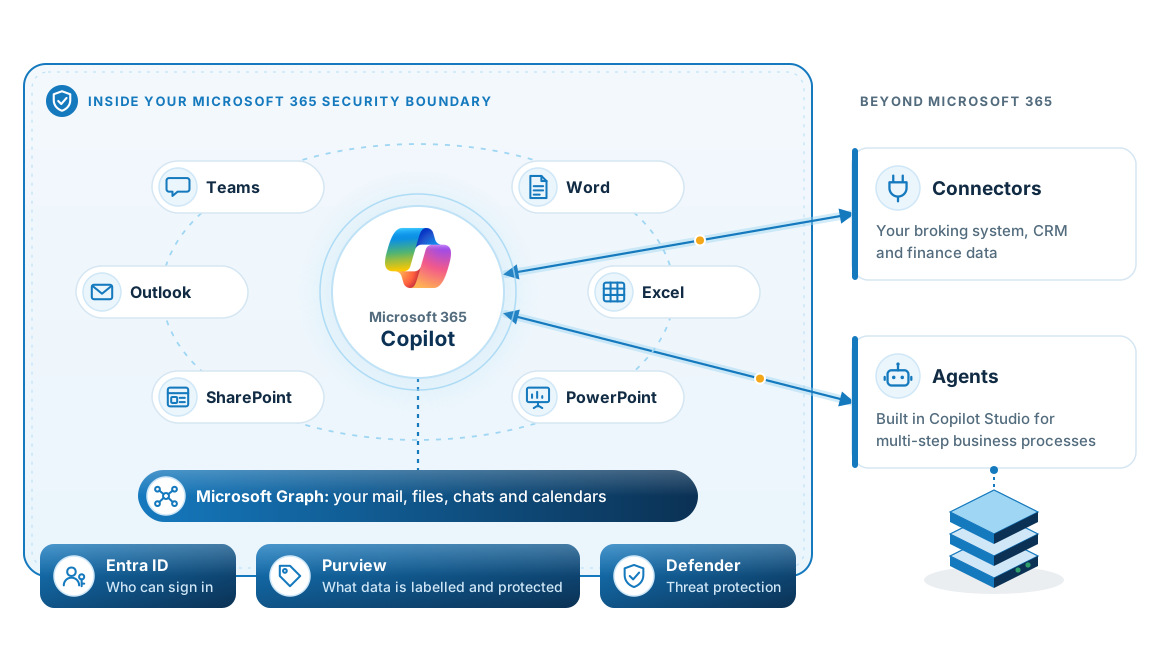
- Inside your tenantPrompts and responses stay within the Microsoft 365 service boundary, and Microsoft states they are not used to train its foundation models.
- Follows your permissionsCopilot only reaches what the person asking can already open, and it respects sensitivity labels.
- Recorded in your audit logPurview records Copilot activity in the same audit log as the rest of your tenant.
- Managed centrallyYour administrators switch on and control licences, connectors and agents, rather than each user.
The amplifier
Copilot can reach more than your people realise.
Copilot answers from every file the person asking can open, including files they do not know they can open. After years of sharing links, broad groups and old team memberships, that is usually far more than anyone expects.
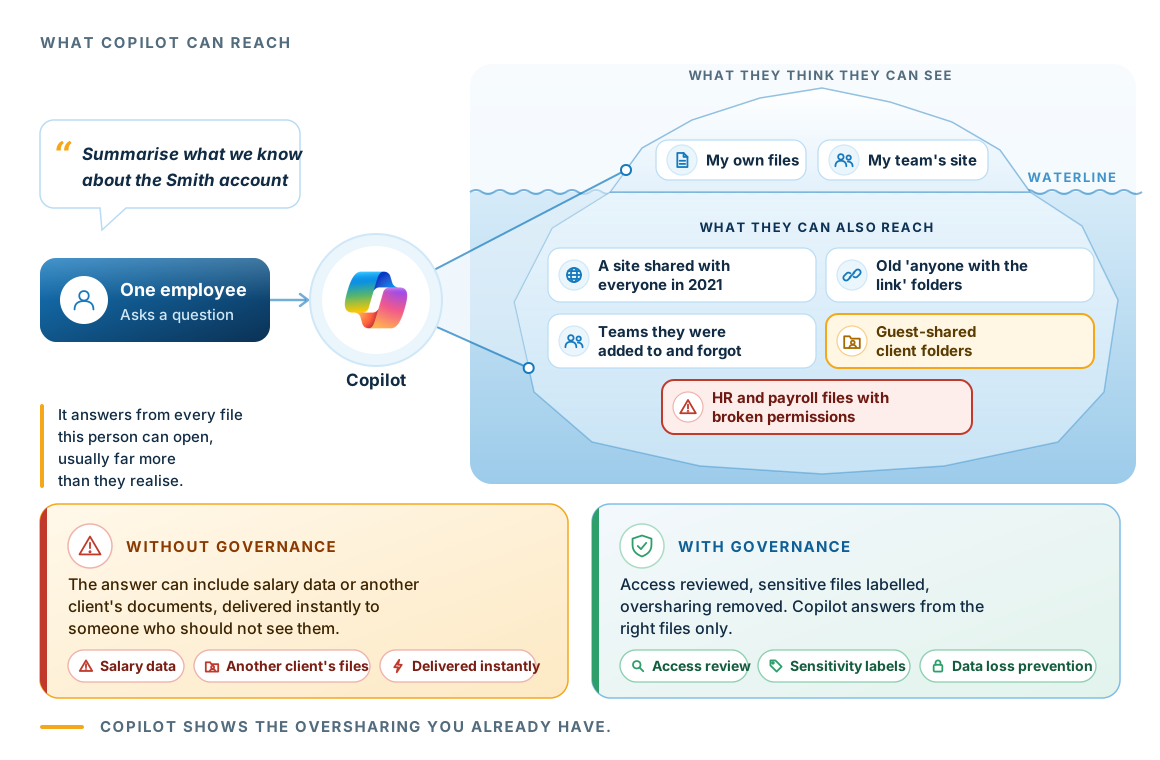
- It inherits accessCopilot answers as the person asking. It holds no permissions of its own, so whatever they can open, it can read.
- Most access goes unnoticedPeople rarely know which old sites, teams and links still give them access. Copilot uses that access anyway.
- Review access before rolloutAn access review and oversharing report lists what is exposed, so it can be fixed before rollout.
- Stop it coming backPurview sensitivity labels and data loss prevention stop new oversharing building up.
AI readiness
Five questions to answer before you buy a licence.
These are the security and readiness questions we work through first. You can answer them yourself to see where you stand.
If you cannot answer all five with confidence, the readiness check is the right first step.
Is multi-factor authentication on every account, with no shared logins?
Copilot works as the signed-in person. If an account is easy to take over, so is that person's Copilot.
Has anyone reviewed who can reach what?
Group memberships, guest access and sharing links build up over years. An access review finds them before rollout.
Is sensitive information labelled and protected?
Purview sensitivity labels and data loss prevention keep confidential material out of answers it should not appear in.
Are the documents it will draw on current and correct?
Copilot answers from your documents. If they are out of date, its answers will be out of date too, and they will still read as confident.
Is there a named person who owns adoption?
Without an owner, licences tend to go unused. Someone needs to be responsible for how people use Copilot, as well as for buying it.
The roadmap
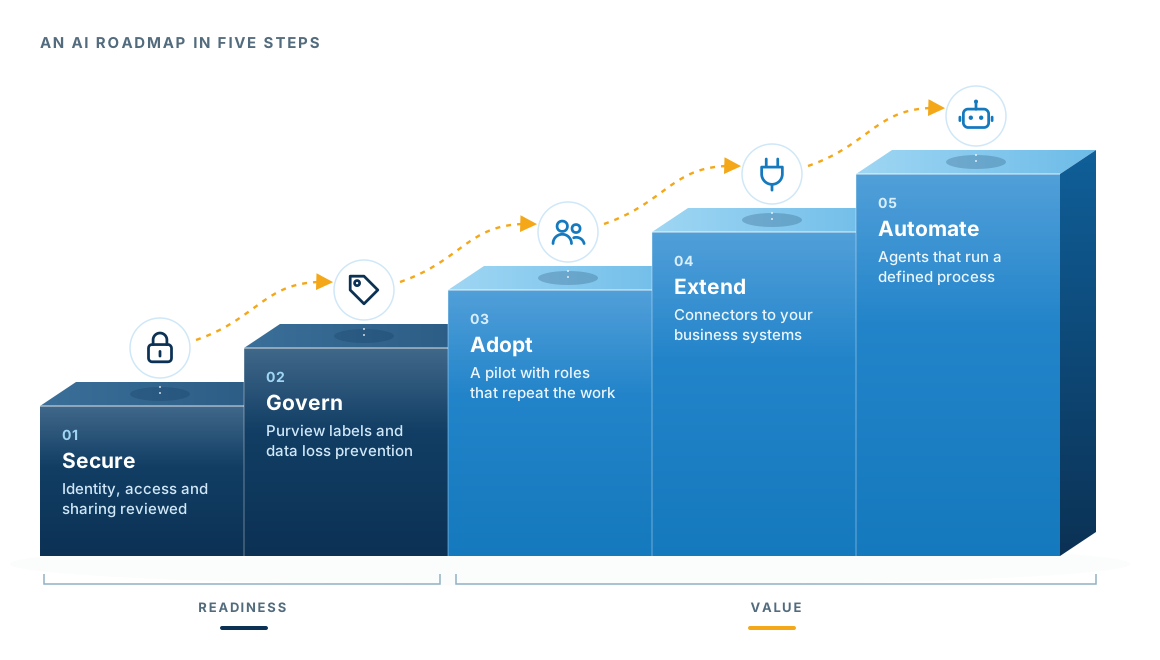
From readiness to agents, in five steps.
Most businesses move through these stages in order. Each stage makes the next one safer and more useful.
Everyday productivity
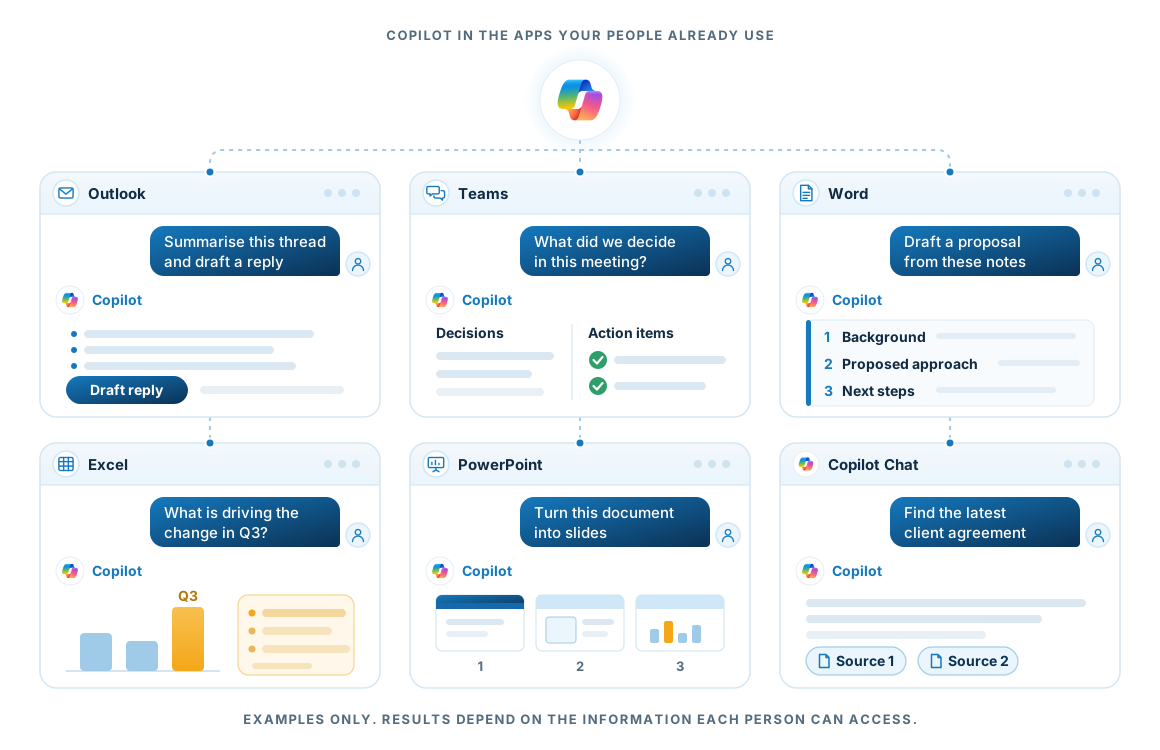
Copilot inside the apps your people already use.
Most of Copilot's day-to-day value comes from the assistant built into the tools people already have open. People ask in plain language, and Copilot works from their own mail, meetings, documents and data.
Beyond the apps
Connect Copilot to the rest of your business.
The biggest gains come when Copilot can use information from outside Microsoft 365, and when it can carry out tasks as well as answer questions.
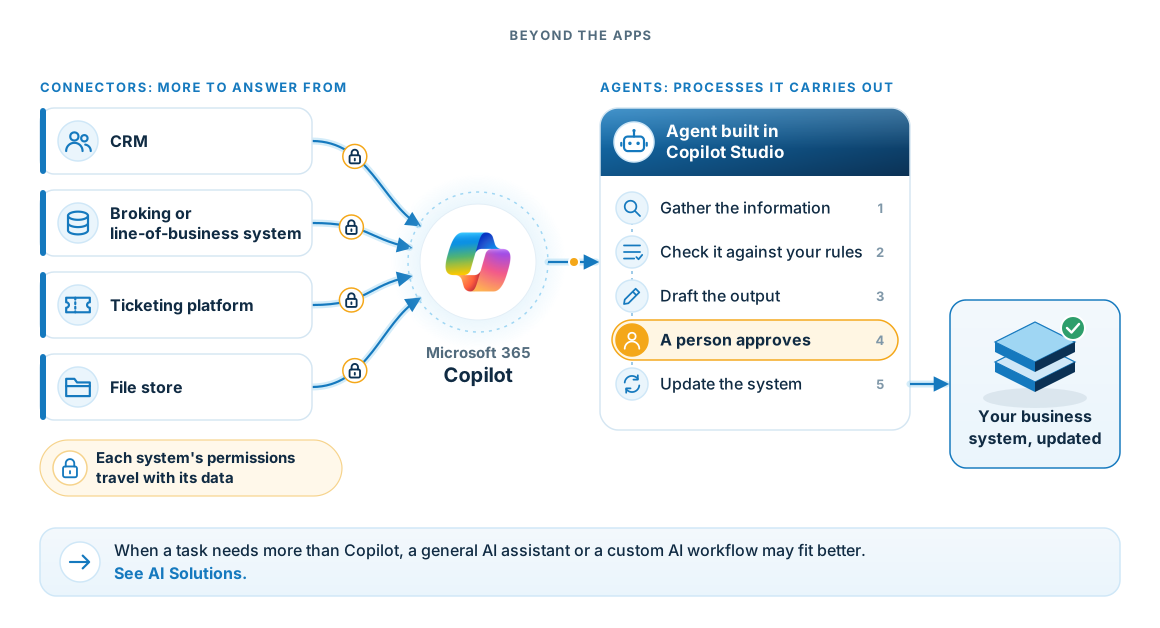
- ConnectorsBring in information from your CRM, line-of-business and ticketing systems. Each connector carries the source system's permissions, so no one sees a record they could not already open.
- AgentsBuilt in Copilot Studio around one defined process. We agree where a person reviews the work before anything is built, and every action the agent takes is logged.
- Switched on centrallyYour administrators enable connectors and agents, not individual users. Some agent capabilities are charged separately, and we confirm what applies before anything is built.
The pilot
Prove the value before you scale.
The pilot runs for eight weeks and ends with a decision to scale, adjust or stop.
- Week 1
Readiness check
We check identity, access, sharing, labels and the licences you already hold, and report what we find.
- Week 2
Choose the cohort
We pick roles with a repeated task worth improving. The people who asked first are not always the right cohort.
- Weeks 3 to 6
Run the pilot
Training based on the cohort's own work, one defined use case, and a person to ask when Copilot does not behave like the demo.
- Week 7
Measure
We compare results with the baseline: time saved, quality of work, and whether people kept using Copilot after the first few weeks.
- Week 8
Decide
Scale to more roles, adjust the use case, or stop. All three are legitimate answers.
If the pilot shows no measurable change, we will tell you, and you avoid paying for a full rollout.
First step
Start with a Copilot readiness check.
Before you buy licences at scale, find out what Copilot would be able to see and where it would add the most value. You keep the findings whether or not you proceed.
Not sure yet where Copilot would help? Tell us how your team works and we will show you where it fits and where it does not. There is no charge for that conversation.
Book a Copilot readiness check- An access review and oversharing report
- Identity, labelling and data protection findings
- Your licensing position against Copilot requirements
- A recommended pilot cohort, use cases and roadmap
Questions
Questions about Copilot.
How is Copilot different from ChatGPT or Claude?
Copilot works inside your Microsoft 365 tenant, answers from your own data, and falls under the identity, compliance and security controls you already run. ChatGPT and Claude are strong general assistants that sit outside Microsoft 365. Many businesses use both, and our AI Solutions page covers how to use them safely.
What licences do we need?
Microsoft 365 Copilot is an add-on licence for eligible Microsoft 365 business and enterprise plans. Copilot Chat is available to Microsoft 365 users without the add-on. We confirm your exact position during the readiness check.
Can Copilot see information it should not?
It can reach anything the person using it can already reach. That is why the access review and labelling come first, and why we treat Copilot readiness as a data governance exercise.
What are agents, and do we need them?
Agents are built in Copilot Studio to carry out a defined process, such as triaging requests or preparing standard documents. They are worth it when a process repeats often and follows clear rules. Most businesses start with everyday productivity and add agents once they know where the time goes.
What if the pilot does not show value?
Then you stop, and that is a legitimate result. We would rather tell you that than sell you licences that go unused.