Access review
Who can reach what today.
- Oversharing and external sharing report
- Guest and external user review
- Permission clean-up on sites, teams and folders
- Inactive sites and missing owners

Data Governance
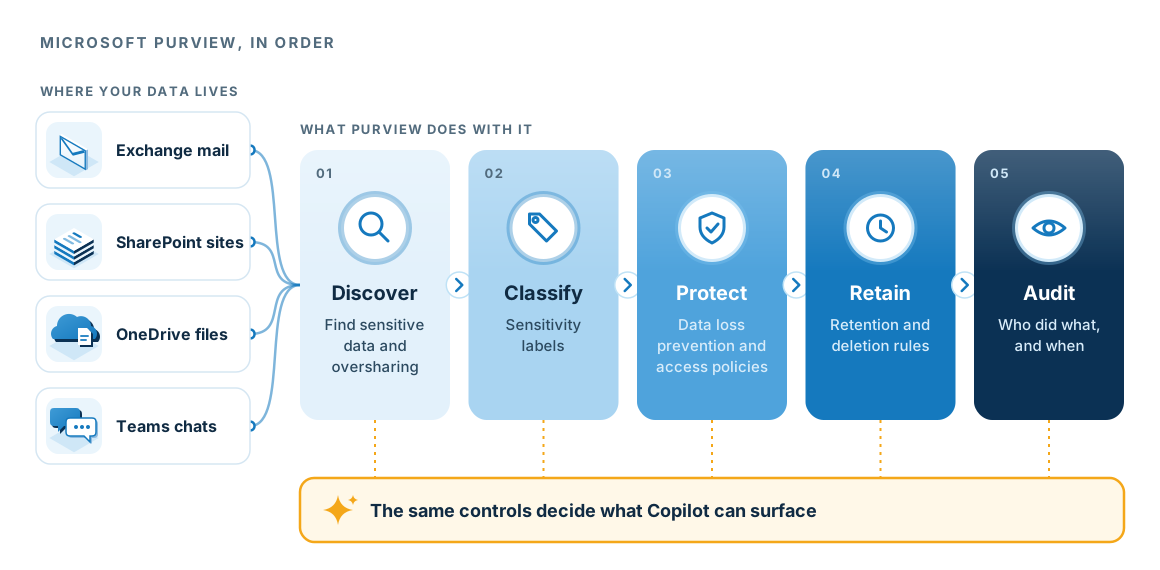
Microsoft Purview is the part of Microsoft 365 that finds, classifies, protects, retains and audits your information. We set it up in the order that removes the most risk first, then keep monitoring it.
Recognise this?
Copilot can surface anything a user can already open, so access needs tidying before the licences arrive.
Sites and folders were shared with everyone, or anyone with the link, years ago and never revisited.
An insurer, client or auditor asks who accessed what, and when, and the answer is hard to produce.
Files go to personal accounts or outside addresses and nobody notices until later.
The approach
We apply each step to the places your information already lives: Exchange, SharePoint, OneDrive and Teams.
Scope
Who can reach what today.
Controls that travel with the information.
Keep information as long as required, then delete it.
A record of who did what, and when.
First step
We look at how your Microsoft 365 information is shared today and show you where the biggest exposures are, in priority order.
Every control here also decides what Copilot can surface, so getting them right makes it safe to switch Copilot on. The controls are worth having even if you never do.
Book a data access reviewQuestions
Microsoft 365 Business Premium includes many Purview features. Some advanced features need enterprise plans or add-ons. We map what you already hold before recommending anything.
Not if we design them with the people who use them. A short list of labels that matches how your business describes information works better than a long list nobody understands.
No. Governance controls who can reach information and how long it is kept. Backup lets you get it back after it is lost or damaged, so you need both.
It gives you the controls and the evidence. Whether that meets a particular obligation depends on the obligation, which is what our Security and Compliance Audit checks.