AI Solutions

AI for the reading, drafting and sorting your team does.

We help businesses use AI in three ways. Chat assistants answer questions and draft text when your team asks. Agentic assistants connect to your systems so they can take action. Custom workflows build AI into one process, with a person checking the parts that matter.

An isometric illustration of business applications linked by automation

Kinds of AI

Chat assistants, agentic assistants and custom workflows.

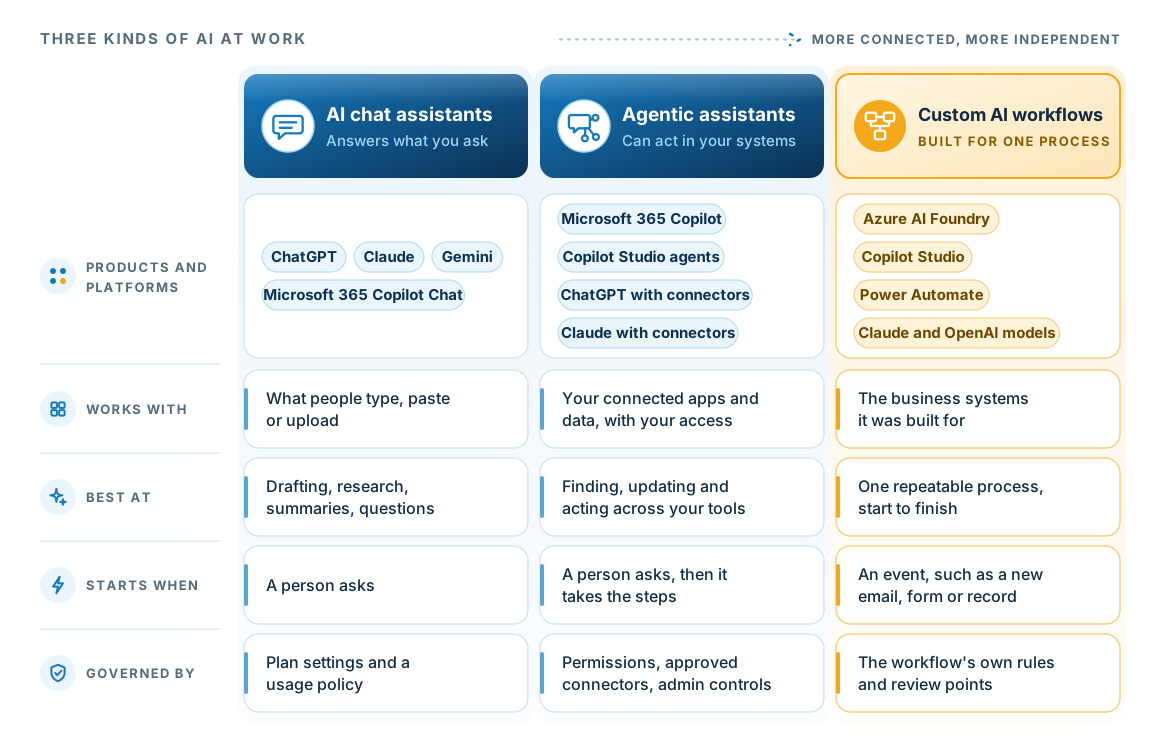
The same product can appear in more than one column. Microsoft 365 Copilot, ChatGPT and Claude answer questions as chat assistants. Once you connect them to your systems, they become agentic assistants that can take action. Custom AI workflows are built around one process and start from an event, such as a new email or form.

A comparison of three kinds of AI. AI chat assistants, such as ChatGPT, Claude, Gemini and Microsoft 365 Copilot Chat, work with what people type, paste or upload, and start when a person asks. Plan settings and a usage policy control them. Agentic assistants, such as Microsoft 365 Copilot, Copilot Studio agents, and ChatGPT or Claude with connectors, work with your connected apps and data using your access, and take steps across your tools. Permissions, approved connectors and admin controls limit what they can do. Custom AI workflows, built on Azure AI Foundry, Copilot Studio, Power Automate, or Claude and OpenAI models, work with the business systems they were built for and start from an event such as a new email or form. The workflow's own rules and review points control them.
Moving right, the AI reaches more of your systems and acts more often without a person asking, so the setup needs more care. Most businesses end up with more than one kind.

What AI is good at

Six things AI does well, and where it needs a person.

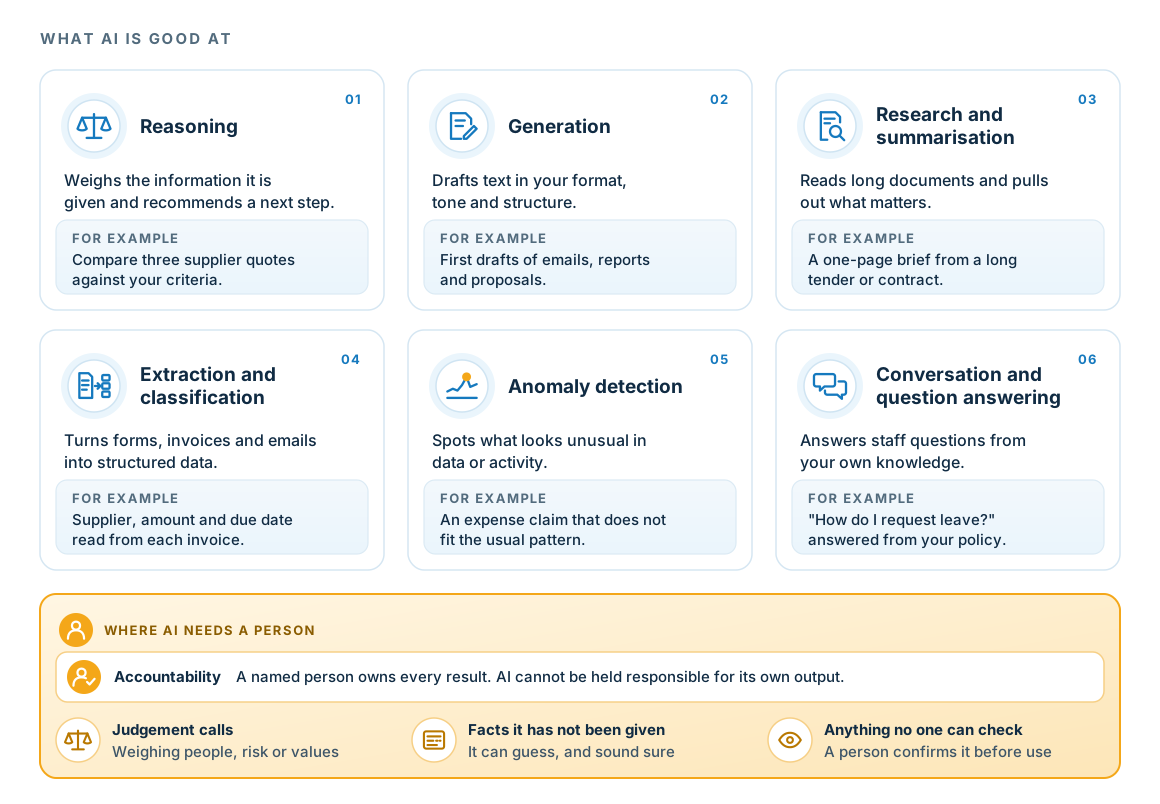
Large language models are strongest at reading, writing and spotting patterns. These six strengths show where AI will help, in a chat assistant or in a workflow. A named person stays accountable for every result, because AI cannot be held responsible for its own output.

Six things AI does well. Reasoning: weighs the information it is given and recommends a next step, such as comparing supplier quotes against your criteria. Generation: drafts text in your format and tone, such as first drafts of emails, reports and proposals. Research and summarisation: reads long documents and pulls out what matters. Extraction and classification: turns forms, invoices and emails into structured data. Anomaly detection: spots what looks unusual in data or activity, such as an expense claim that does not fit the usual pattern. Conversation and question answering: answers staff questions from your own knowledge. A note on where AI needs a person starts with accountability: a named person owns every result, because AI cannot be held responsible for its own output. A person is also needed for judgement calls, facts the AI has not been given, and anything no one can check.
A person also decides on judgement calls, facts the AI has not been given, and anything no one can check, because AI can sound sure when it is guessing.

Examples

Six patterns where a custom AI workflow saves time.

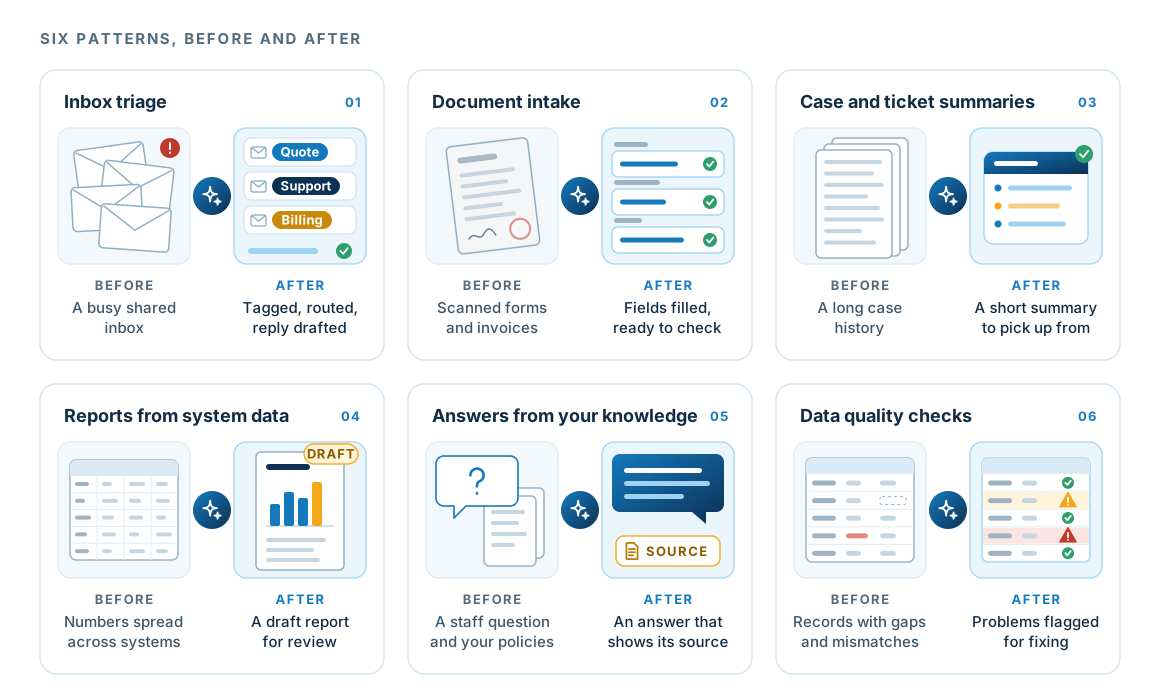
Each pattern is shown as the work before and after. The workshop tests whether any of them fits your business.

Six workflow patterns shown before and after. Inbox triage: a busy shared inbox becomes tagged, routed messages with replies drafted. Document intake: scanned forms and invoices become filled fields ready to check. Case and ticket summaries: a long case history becomes a short summary. Reports from system data: numbers spread across systems become a draft report for review. Answers from your knowledge: the workflow answers a staff question from your policies and shows the source. Data quality checks: records with gaps and mismatches become a list of flagged problems to fix.
In each one the AI does the reading, sorting and drafting, and a person checks the result before anyone acts on it.
  1. Inbox triageRead incoming requests, work out what each one is, pull out the details and route it or draft the reply.
  2. Document intakeRead forms, invoices, certificates and schedules, and put the right fields into your system for checking.
  3. Case and ticket summariesTurn a long history into a short, accurate summary before someone picks it up.
  4. Reports from system dataDraft the monthly or client report from the numbers, ready for a person to review.
  5. Answers from your knowledgeAnswer staff questions from your own policies and procedures, showing the source.
  6. Data quality checksSpot missing, inconsistent or out-of-date records before they cause a problem.

Chat and agentic assistants

ChatGPT, Claude and Copilot, used safely.

Your staff are probably already using AI assistants. We help you choose business plans, decide what each assistant may connect to, and give staff clear rules on what they can share.

Choose and set up

Move staff from personal accounts to business plans.

  • Business or enterprise plans with admin controls
  • Single sign-on and account management where the plan supports it
  • Data retention and training settings checked

Approve each connection

An agentic assistant acts with whatever access you give it.

  • Connections to your files and systems approved one at a time
  • Access checked before an assistant can read or act
  • A person approves actions that send, change or delete

Policy and training

Written rules and training for staff.

  • An AI acceptable use policy
  • What staff can and cannot share with an assistant
  • Role-based training on getting good results
  • A named owner for questions and exceptions

Find what is already in use

Current use shows where the demand is.

  • Discovery of informal AI use across the business
  • Risk review of the tools you find
  • Consolidation onto approved tools
  • A short report on where AI is already saving time

Custom AI workflows

The six stages of a custom AI workflow.

Custom workflows are where AI does the most for a business. The AI runs inside one process each time it starts, such as when a new email or form arrives, so no one has to open a chat and ask. We build on Microsoft platforms (Azure AI Foundry, Copilot Studio and Power Automate) and use other models, such as Claude and OpenAI, where they suit the task better.
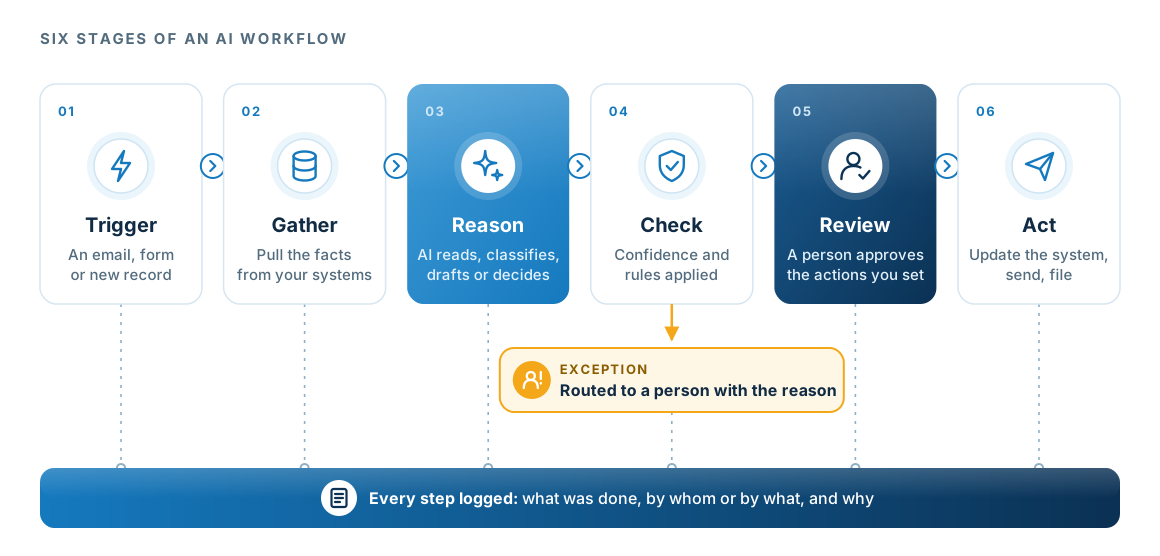
A six-stage AI workflow: trigger, gather, reason, check, review and act. An exception path from the check stage routes unclear cases to a person, and the workflow logs every step.
The AI does the reading, reasoning and drafting. People make the judgement calls and handle the exceptions, and the log shows who or what did each step.

Confidence

Confidence decides who acts.

For each item it handles, the AI records a decision and a score for how sure it is. Anything below the threshold agreed with you goes to a person.
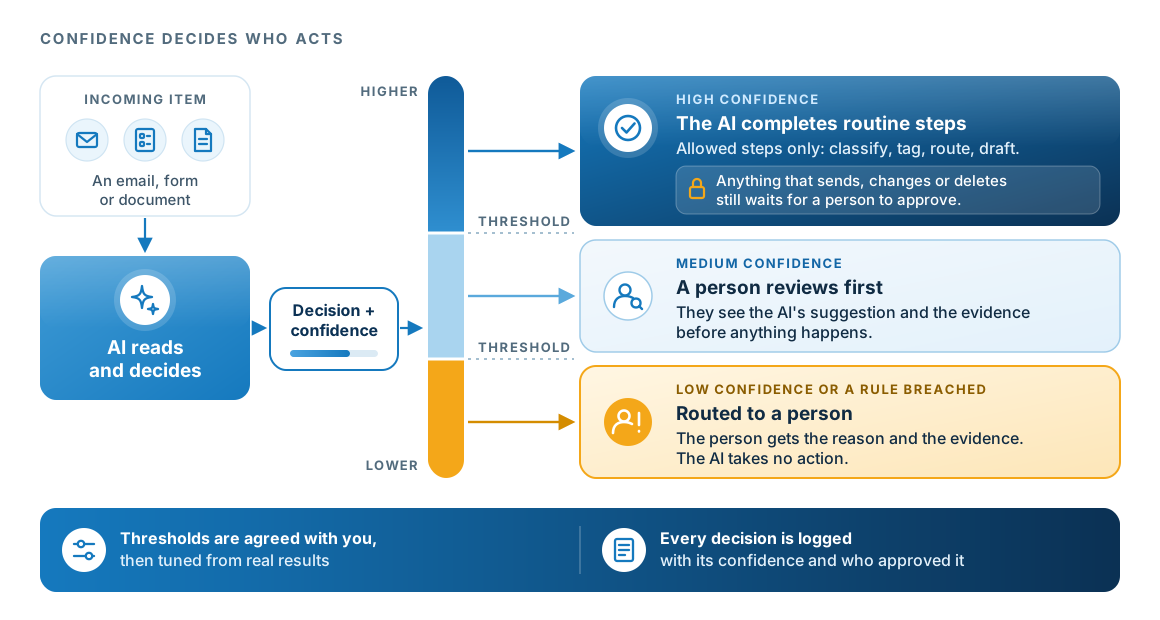
An incoming email, form or document goes to the AI, which reads it and returns a decision plus a confidence level. A confidence scale with two agreed thresholds splits the work into three lanes. High confidence: the AI completes the routine steps it is allowed to do, such as classify, tag, route and draft, and anything that sends, changes or deletes still waits for a person to approve. Medium confidence: a person reviews the AI's suggestion and the evidence before anything happens. Low confidence or a rule breached: the item goes to a person with the reason and the evidence, and the AI takes no action. Thresholds are agreed with you, then tuned from real results. Every decision is logged with its confidence and who approved it.
The less sure the AI is, the more of the work passes to a person. Even at high confidence, a person approves any action that sends, changes or deletes.
  1. Setting the thresholdsWe set the starting thresholds with you during the prototype, using real examples from your process.
  2. What a reviewer seesThe item, the AI's suggested decision, its confidence score and the evidence it used. The reviewer accepts or corrects it.
  3. Using the logAt each quality check we look at how many items went to each lane and where people corrected the AI, then adjust the thresholds.

Qualify it first

Is the task a good fit for AI?

Run the idea through these four questions before anyone starts building. It is the same test we apply in a workshop.

If the answer to all four is yes, the task is probably worth building. If only two or three are yes, the process may need work first. We will tell you which applies.

  1. Does it happen often enough for the time to add up?

    A task done twice a year costs more to automate than it saves. The savings add up on tasks done every week or every day.

  2. Is the input mostly reading, writing or sorting?

    AI is strongest at reading documents, extracting details, drafting and classifying, so those tasks make the best candidates.

  3. Is the information somewhere a system can reach?

    AI cannot use information that has never been written down, or that sits in a system it has no way to connect to.

  4. Is there a person who will own the result?

    AI cannot be held responsible for its output, so every workflow needs a named person who owns the result, a point where a person checks it, and a path for cases the AI is not sure about.

Questions

Questions about AI.

How is this different from Microsoft Copilot?

Microsoft 365 Copilot is one of the assistants on this page. Copilot Chat works as a chat assistant, and Microsoft 365 Copilot with connectors or Copilot Studio agents works as an agentic assistant inside your tenant. Our Microsoft Copilot page covers getting it ready and rolling it out. This page also covers other assistants, such as ChatGPT and Claude, and custom workflows built around one process in your business.

What is the difference between a chat assistant and an agentic one?

A chat assistant works with what you give it in the conversation and hands the answer back to you. An agentic assistant connects to your services, such as email, files or a business system, so it can look things up and take steps for you, within the permissions it has. That extra reach is useful, and it is why each connection needs a deliberate decision.

Is it safe to let staff use ChatGPT or Claude?

It can be, on a business plan with the right settings, a clear policy on what staff can share, and connections to company systems approved one at a time. Personal accounts with no rules are where the risk is.

Where does a person stay in the loop?

Every workflow we build has a named owner and a defined point where a person reviews the output. The AI scores how sure it is of each decision, and anything below the threshold agreed with you goes to a person with the reason and the evidence. A person approves actions that send, change or delete, whatever the confidence. Each workflow or agent can reach only the data it needs, its connections are reviewed before it can act, and every action is logged.

Which AI platforms do you build on?

Mostly Microsoft: Azure AI Foundry, Copilot Studio and Power Automate, which suit work that already lives in Microsoft 365 and Azure. Where another model fits the task better, such as Claude or an OpenAI model, we use it and explain why. The choice starts from where your data lives and what your obligations require.