
Microsoft 365

Microsoft 365, migrated and then looked after.

IT Logic is a Microsoft Solutions Partner and Microsoft 365 migration specialist. We plan, stage and check every migration, so you know what will happen before it happens.

  • Migration specialists
  • Administration as a service
  • Backup and reporting
An isometric illustration of a laptop, phone and monitor on one platform, surrounded by mail, chat, document and cloud tiles, an identity badge with a shield and key, and a device management gear.

The environment

What is inside your tenant.

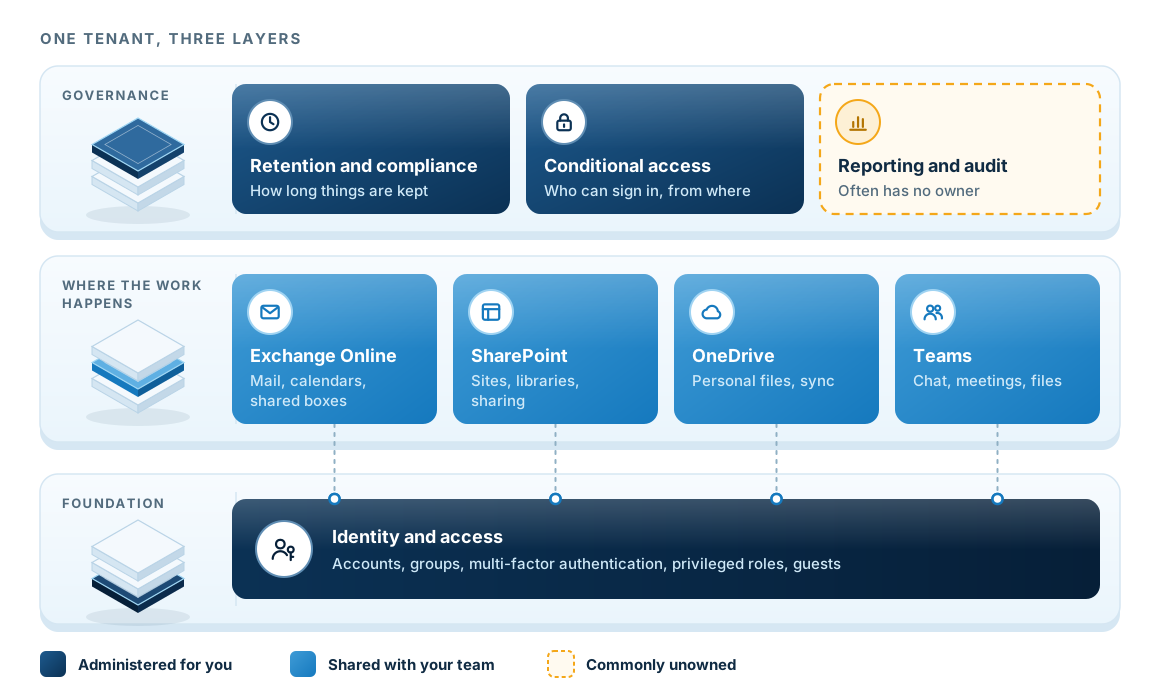
Three stacked layers: a governance band holding retention and compliance, conditional access, and reporting and audit; a workload band holding Exchange Online, SharePoint, OneDrive and Teams; and an identity and access foundation underneath both. A key marks which layers are administered for you, shared with your team, or commonly unowned.
Most of the problems we inherit sit in the governance and identity layers, while people tend to look at the workloads in the middle.
  1. Governance sits on topRetention, conditional access and audit. These are usually set once at the start and rarely revisited.
  2. Workloads in the middleThe four services your people open every day. Administration is shared, because your team makes changes here too.
  3. Identity underneathAccounts, groups, multi-factor authentication and privileged roles. Every workload above inherits from here.
  4. The gap we usually findReporting and audit is the area we most often find without an owner. It is also the area insurers ask about.

Security and devices

Setting up the security tools in Business Premium.

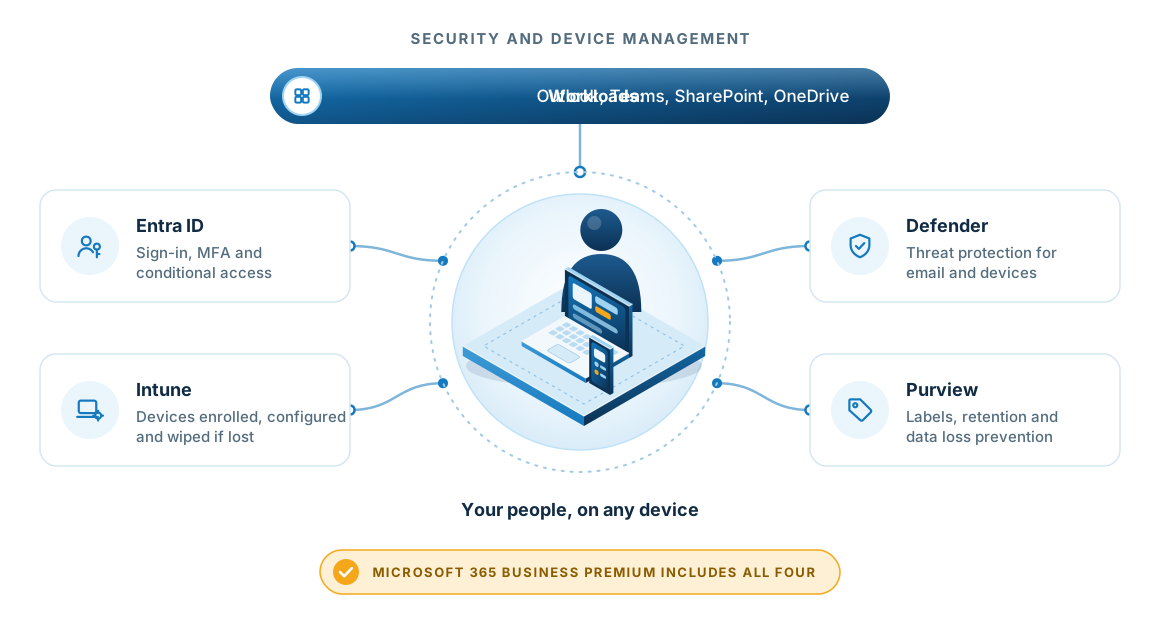
Microsoft 365 Business Premium includes security and device management as well as email and files. That is where most of its value sits, and it is the part most tenants we inherit underuse.

A person with a laptop and phone at the centre, surrounded by Entra ID for sign-in and conditional access, Intune for device management, Defender for threat protection and Purview for labels, retention and data loss prevention, under Outlook, Teams, SharePoint and OneDrive.
Business Premium includes all four tools. We configure them so people can work from any location while the business keeps control of accounts, devices and data.
See data governance

Migration

How a migration runs.

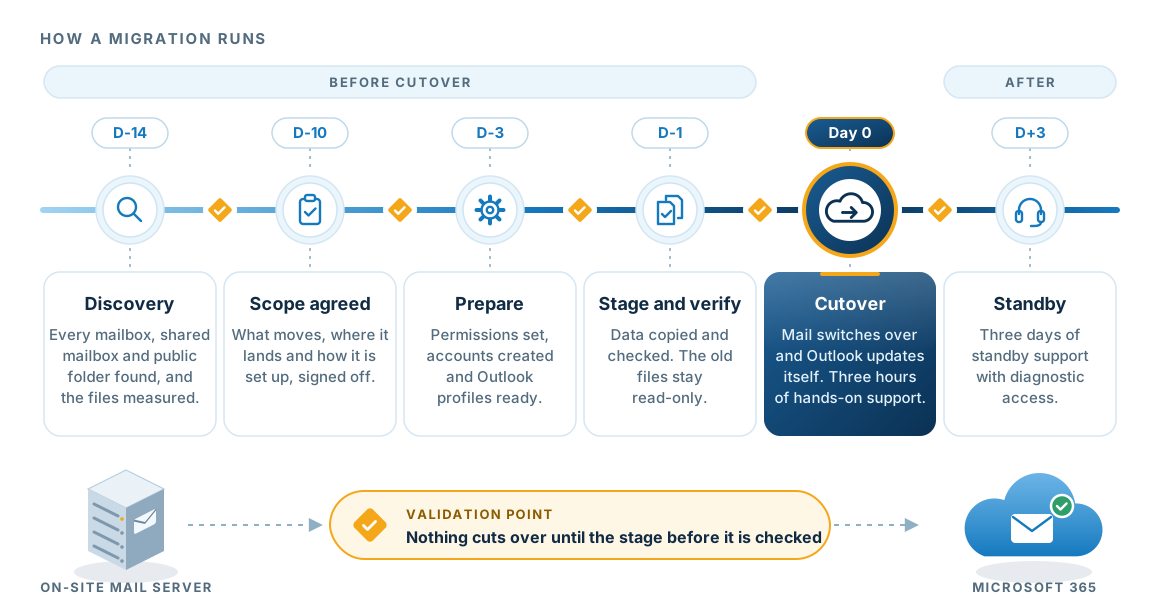
Every stage ends with a validation point. Nothing cuts over until we have checked the stage before it.

A timeline from two weeks before cutover to three days after: discovery, scope agreed, prepare, stage and verify, cutover on day zero with three hours of hands-on support, and three days of standby support, with a validation point between each stage.
Email cutovers include three hours of hands-on support on the day and three days of standby support afterwards.

Ongoing

Running the tenant afterwards.

The migration is the easy part. Most tenants we inherit were set up quickly and never revisited, so the real work is how the tenant is run afterwards. These services can be taken together or individually, and sit outside a managed services agreement.

Administration as a service

Day-to-day tenant work, done by us so your staff do not have to.

  • User provisioning and removal
  • Licence assignment and reassignment
  • Permission changes for shared mailboxes, distribution groups and calendars
  • Domain management for up to five domains
  • SMTP alias and mailbox archiving
  • Retention policies and compliance
  • Spam filtering, Teams and Microsoft 365 Groups

Backup as a service

Protection beyond what Microsoft retains by default.

  • Full mailboxes, shared mailboxes and public folders
  • Individual emails, contacts, calendar, tasks, notes and journals
  • SharePoint Online files
  • Backup monitoring, health and outage notification
  • Monthly reporting, with restores available on request

Reporting and audit

Regular reports and alerts on what is happening inside the tenant.

  • Custom dashboards and configurable alerting
  • Real-time service status and Microsoft outage visibility
  • Exchange Online traffic, spam and storage forecasting
  • Monthly change reporting across accounts and groups
  • SharePoint and OneDrive storage, permissions and sharing settings
  • Sign-in discovery for failed logins, unapproved locations and impossible travel

Questions

Questions about Microsoft 365.

What support do we get on the day?

Email cutovers include three hours of hands-on support on the day and three days of standby support afterwards, with diagnostic access to resolve issues as they arise.

Does Microsoft not back up our data already?

Microsoft retains data for a limited period and its protection is designed for platform failure. It does not cover your own deletions or a compromised account. Backup as a service holds a separate copy you control.

Can you set up a new tenant from scratch?

Yes. We handle domain configuration, user accounts, shared mailboxes, licences and distribution groups as part of the tenant setup.

Where does tenant administration stop?

Administration as a service covers the tenant. Desktop support, password resets and first-level support belong in a managed services agreement, and on-premises Exchange, Active Directory and server support are separate. We quote SharePoint development, Dynamics 365 and Power BI work separately, and will tell you plainly which side a request falls on.