

Cloud Services

Move servers to Azure, or replace them with cloud applications.

Some businesses move their existing servers and applications into Azure. Many can stop running servers altogether by switching to cloud-based applications, which makes the whole IT setup simpler. We work out which route fits each system.

  • Move to SaaS applications
  • Move servers to Azure
  • Or a mix of both
An isometric illustration of files moving from a laptop into Microsoft 365 and Azure

Two routes

You may not need cloud servers at all.

Moving to the cloud can mean running your existing servers in Azure, or replacing them with cloud-based software you subscribe to. The second route often removes servers entirely.

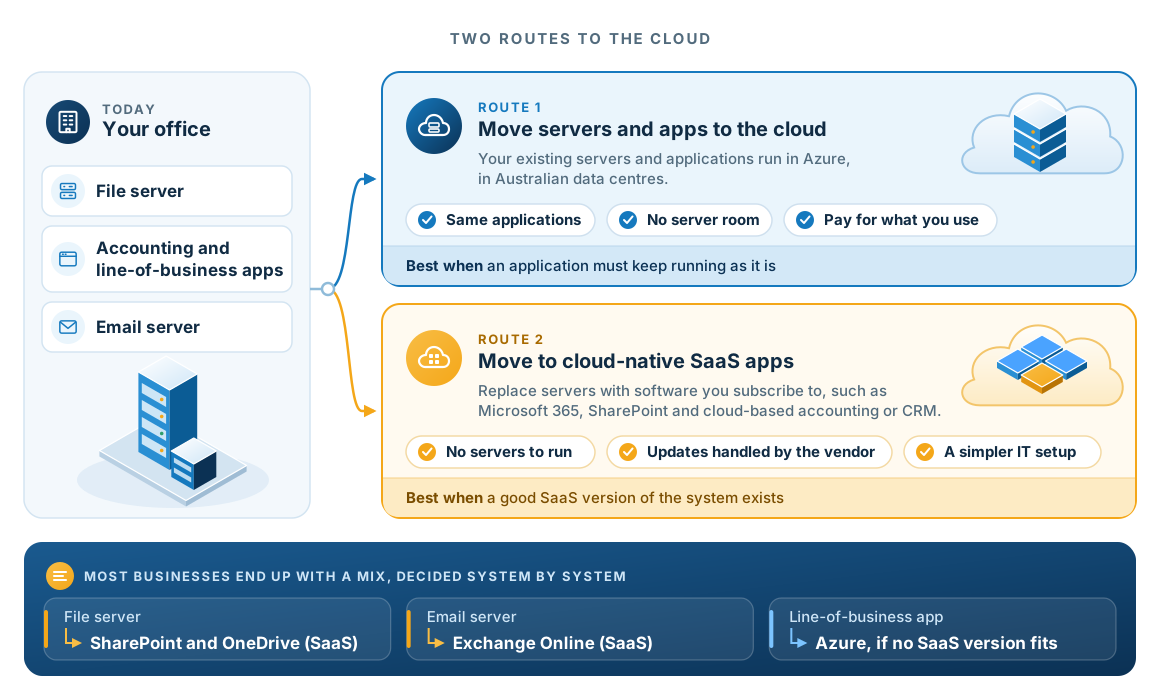
Two routes from an office with on-site servers. Route one moves existing servers and applications into Azure in Australian data centres. Route two replaces them with cloud-native SaaS applications such as Microsoft 365, SharePoint and cloud-based accounting or CRM, so there are no servers to run. Most businesses end up with a mix: the file server moves to SharePoint and OneDrive, the email server to Exchange Online, and a line-of-business application to Azure if no SaaS version fits.
Most businesses end up with a mix. We decide one system at a time, based on what each one needs.
  1. Simpler to runFewer servers means less patching, fewer backups to manage and fewer things that can fail.

Which route

How we decide, system by system.

We ask four questions of each system, in this order: does the vendor specify the hardware, does it exchange data constantly with on-site equipment, is it already covered by a licence you hold, and does it serve machines or people.

Move to a SaaS application

When a good cloud-based version exists.

  • File servers replaced by SharePoint and OneDrive
  • Email servers replaced by Exchange Online
  • Accounting and CRM moved to the vendor's cloud edition
  • Phone systems replaced by a cloud phone system
Move the server to Azure

When the application has to keep running as it is.

  • Line-of-business applications with no SaaS edition
  • SQL databases behind your business systems
  • Remote desktop environments
  • Systems with a vendor-specified server

Keep it on site

When distance or on-site equipment requires it.

  • Systems tied to on-site equipment
  • Applications the vendor will not support in the cloud
  • Hardware you own that is mid-life

The result

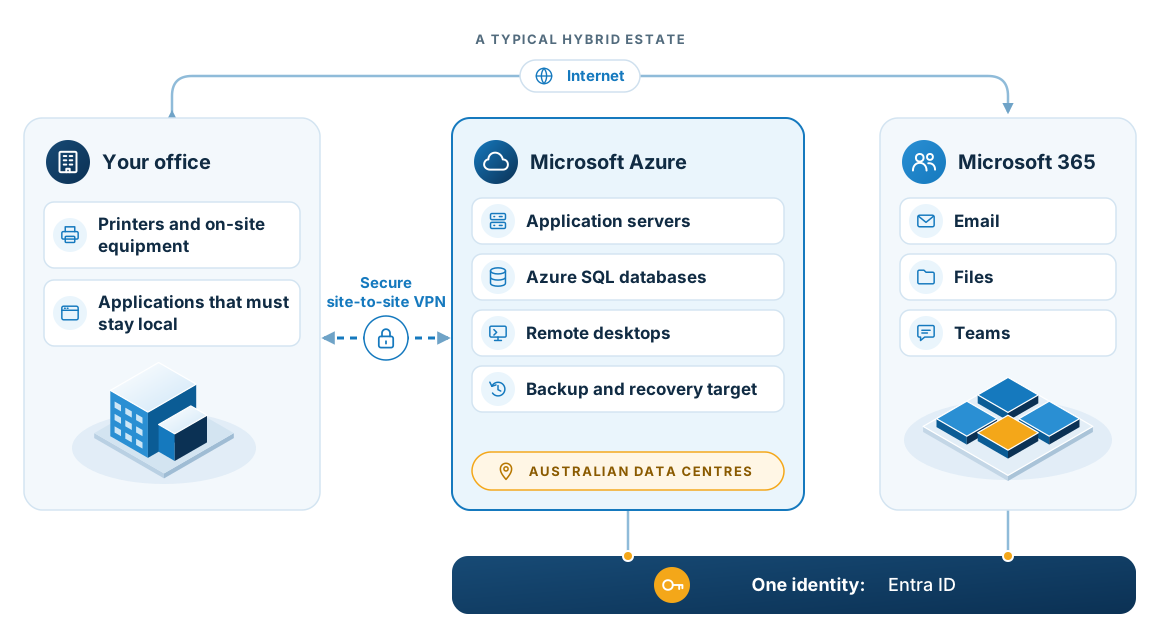
A typical hybrid estate when servers move to Azure.

Three zones: the office with printers and applications that must stay local, Microsoft Azure with application servers, Azure SQL databases, remote desktops and a backup target in Australian data centres, and Microsoft 365 with email, files and Teams, joined by a site-to-site VPN, the internet and one identity in Entra ID.
Line-of-business applications, databases and remote desktops often belong in Azure rather than Microsoft 365, and some things stay on site.

Michael Parker

Moving to the cloud made the system noticeably more responsive, and being able to manage the service up and down has saved us money.

Michael Parker, Director, Queenscorp Insurance Services

In practice

Two examples from client work.

OrganiseIT in the cloud

We have worked with OrganiseIT for over ten years. Running it on Microsoft Azure SQL removes the cost of an on-site SQL server and its licensing, and shifts the platform to a pay-as-you-use model.

Data stays in Australian data centres, which helps you meet Australian privacy obligations. Ten years of backup retention is included, and the service can be started and stopped from a phone.

A migration at scale

A national client moved more than fifteen servers and around three hundred users to Azure and Microsoft 365, then grew past six hundred users on the same platform.

We staged the work so the business kept operating throughout, then moved the environment into ongoing managed support.

Our major cloud vendors.

  • Microsoft Solutions Partner
  • Microsoft Surface authorised reseller
  • Symantec Silver Partner
  • OrganiseIT
  • GoTo
  • Veeam ProPartner Registered
  • NTT
  • StorageCraft Elite Partner

Questions

Questions about moving to the cloud.

Do we have to move everything to the cloud?

No. We plan around what suits the business. Some workloads belong in Microsoft 365 or Azure, some belong on site, and many businesses run a mix. We will tell you plainly which is which.

Do we need Azure to move to the cloud?

Not always. Many businesses can replace their servers with cloud-based applications, such as SharePoint for files and the cloud edition of their accounting or CRM system, and stop running servers altogether. Azure is the right answer when an application has to keep running as it is.

Where is our data stored?

For the services we build on Azure, data is held in Australian data centres. For Microsoft 365, data residency follows your tenant configuration, which we set at the start.

What happens if a migration goes wrong?

We stage migrations in waves, with a validation step and a way back at each one. Email cutovers include hands-on support on the day and standby support afterwards.

Can you supply our internet as well?

Yes. Business-grade internet can be part of the same agreement, because cloud services depend on the connection into them.